Add your accountant to QuickBooks Online

Invite Snap Advisory to your QuickBooks Online company as an accounting firm user.

  1. Log into QuickBooks Online

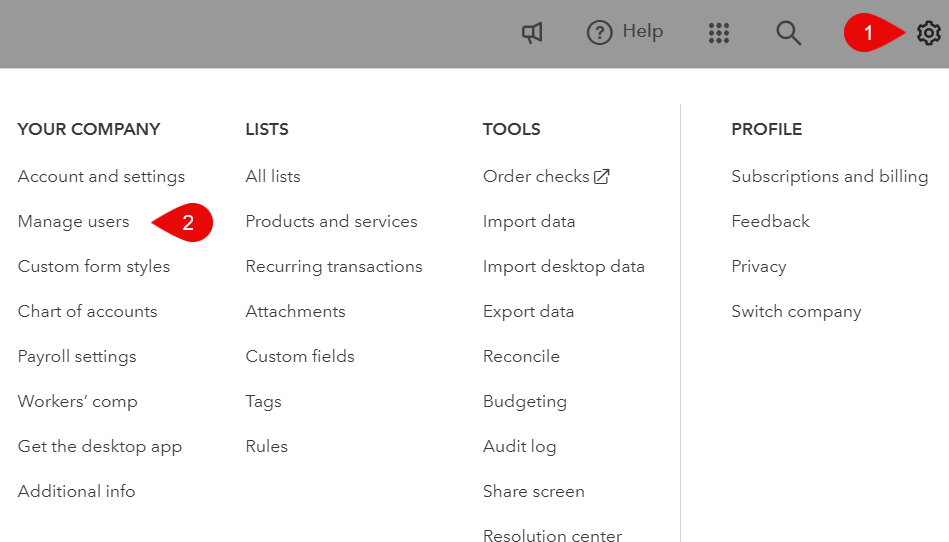
  2. Click the gear icon in the top right

    QuickBooks Online with the gear icon in the top right highlighted

  3. Click Accounting Firms at the top, then the green Invite button
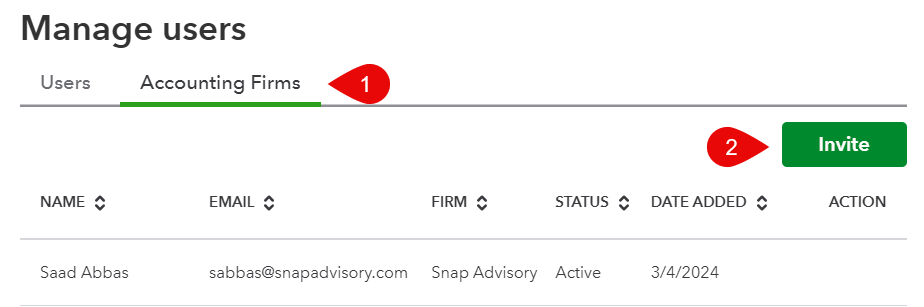
    QuickBooks Online manage users screen on the Accounting Firms tab with the Invite button

  4. Enter the name and email address sabbas@snapadvisory.com and send the invite

Accountant access does not use one of your regular user seats.

Need help? Send a message through the client portal (Opens in a new tab) or email info@snapadvisory.com.

← All resources

These choices do not subscribe you to email or text messages. Forms and scheduling tools load separately when you request them. Read our Privacy Policy.